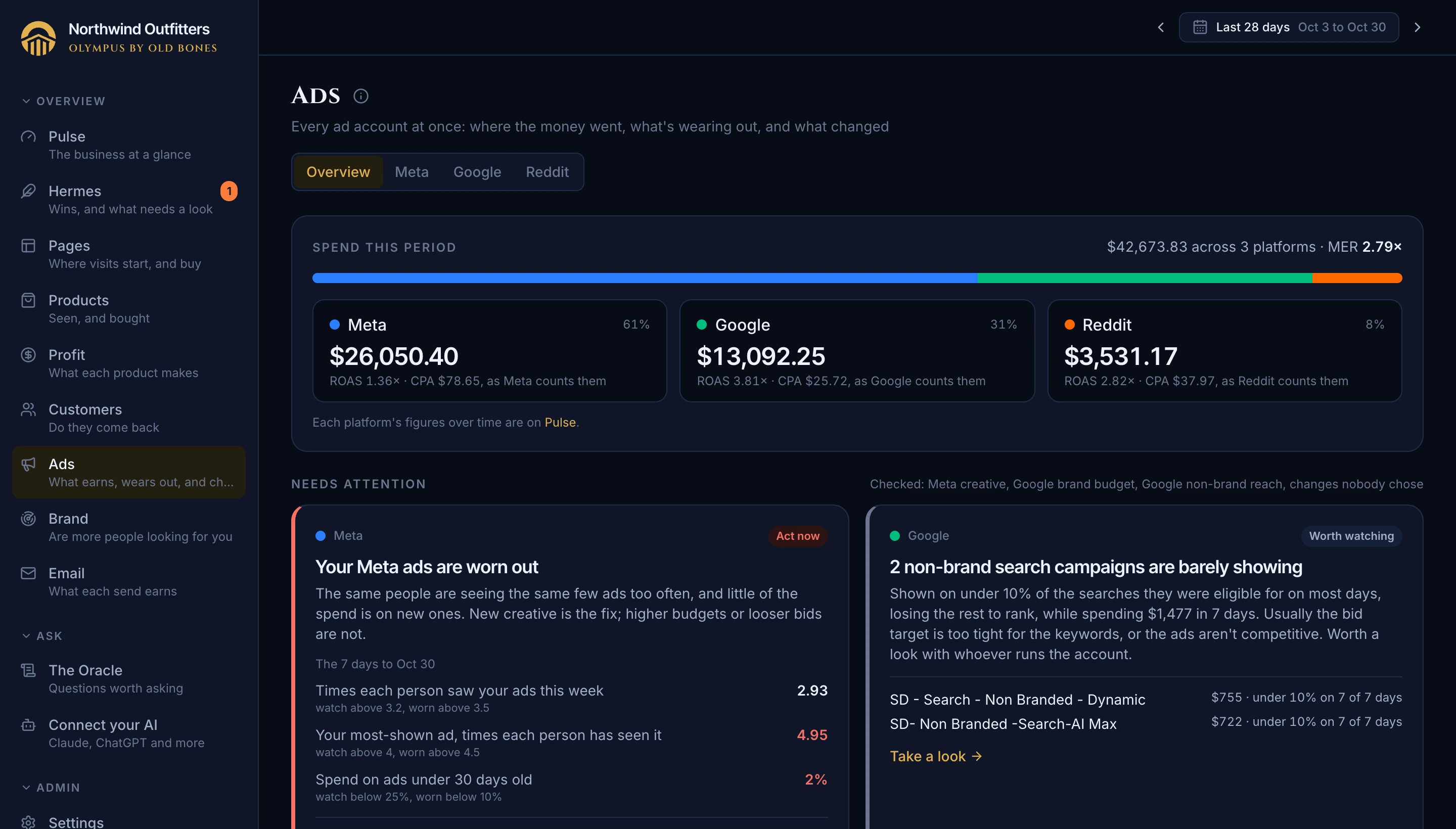
Every ad account side by side, held against what your store actually took in, not what each platform claims. Free is everything you connect and see; Pantheon adds asking about it in your own AI.
Free
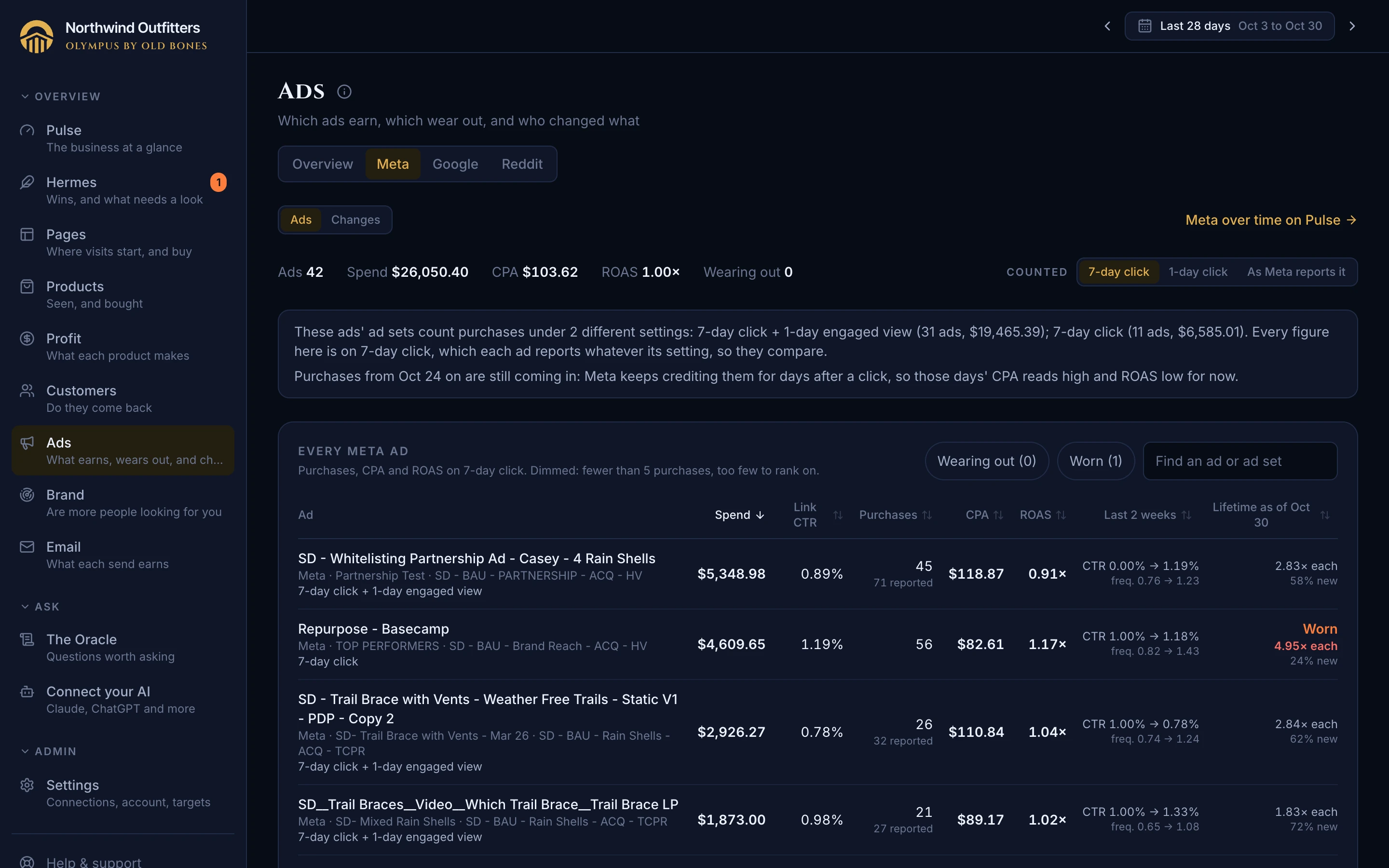
One page for all your ad accounts: where this period's money went by platform, a card for each problem found on any of them (ads worn out, brand ads running out of budget, campaigns that can barely show, changes nobody chose), and what changed in any account this week. Then a page for each platform: Meta's ads one by one; every Google campaign with its type, cost per conversion, return on ad spend and how many of the searches it could have shown on it did, brand campaigns kept apart; every Reddit campaign with its cost per purchase.
Sound familiar? Opening three ad managers, each counting its own way, to answer "where did the money go and what's working".
Where: Ads; each platform's page on Pulse links to its Ads page
Free
Every ad platform claims credit for your sales, and a sale two platforms both touched is claimed by both. Olympus shows each platform's spend and claims side by side, then puts all the claims against what your store actually took, so you know what's real. Each platform's figures open their own history, including an estimate of what it pays for each new customer, not just each purchase it claims. Meta's figures can be read on one attribution rule for every ad set, so a change of ad set settings never looks like a change in performance, and the page tells you when one happened.
Sound familiar? Meta, Google and Reddit dashboards that together claim more sales than you made, and a CPA that "improves" because an agency changed how purchases are counted.
Where: Pulse, Ad platforms card; a page for each platform, and a page for each of its figures
PaidPantheon
Ask your AI which campaigns to cut or scale and it reads every campaign on every ad platform in one go, the same figures as your Ads page: spend, return, cost per sale and the period before. Each is held to the margin of what its own visitors bought, so a campaign selling your best-margin product isn't judged by your store's average, and you see what each one leaves after its cost, what changed in it lately, and which are too new to judge.
Sound familiar? Judging a campaign against a single store-wide ROAS target that's too strict for some products and too loose for others, and rebuilding the numbers by hand to find out.
Where: Your AI on the Pantheon plan
PaidPantheon
Olympus keeps every search term your Google ads were clicked for, every day, back through your history, not only the top few. Ask your AI which searches spent without a sale this month, brand and non-brand apart, and it adds them up over any dates you name, says which campaigns they ran in, and flags the ones with too few clicks to judge. It also says how much of your Google spend those terms cover and how many recent sales Google hasn't credited yet, so a negative keyword is a decision, not a guess.
Sound familiar? Wasted search spend hiding in thousands of small terms that only show up one at a time in Google's own report.
Where: Your AI on the Pantheon plan
Free
Set the words people use to search for you, started from your shop's name and web address, and see which of your top searches they catch before you save; Olympus then re-reads your search history with them. Then pick your branded Google Ads campaigns once, from a list of everything that ran in the last 90 days, with the likely ones suggested. Olympus counts how many people search for your name each day, splits paid brand clicks from organic, and marks brand campaigns on the Ads pages. Whole words only, so a short name doesn't match inside other words, and campaigns picked by hand: one called "Non Branded" contains the word "Branded" too.
Sound familiar? Reports that lump brand campaigns in with everything else make them look like your best ads, when they mostly catch people already looking for you.
Where: Settings, Brand
FreeMore on Pantheon
Olympus counts the new visitors who came to your store without clicking an ad: typing your address or finding you in search. Read it beside brand searches and your ad spend, week by week, to see whether awareness campaigns bring people back later, even when they get no credit for the sale.
Sound familiar? Awareness ads look like a waste on their own numbers, because the people they reach usually come back later through Google or by typing your name, and that channel gets the credit.
Where: Brand, beside brand searches; its metric page; Ares reads it too, on the Pantheon plan
Free
Brand puts the two signs of awareness side by side, week by week: how many people searched for your name on Google, and how many new visitors came to your store on their own. Under them, your ad spend, and on any week the budget moves that might explain a change. Then who catches that demand, your free organic listing or the brand ads you pay for, and what a paid brand click costs. Each part says what it needs instead of showing zero.
Sound familiar? Awareness ads get cut first because they never get credit for a sale, and nobody notices brand ads quietly buying clicks you'd have had for free.
Where: Brand
FreeMore on Pantheon
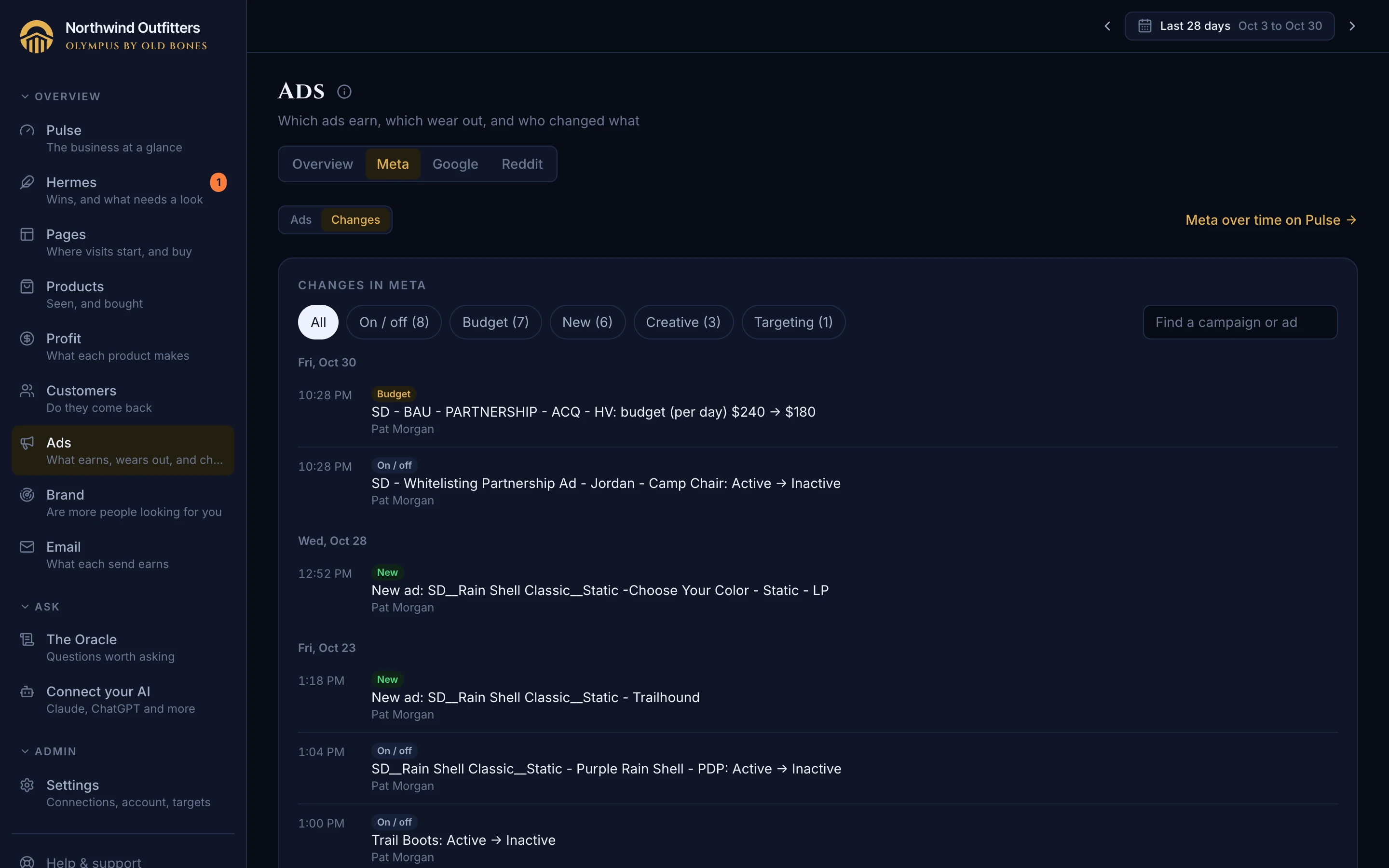
Every change in your ad accounts, kept for good: budgets, bids and cost caps, campaigns and ads turned on or off, new ads, creative and targeting edits, with who made each one and the before and after. Changes no person made, like Google's auto-applied recommendations, stand out. Google keeps its own history for only 30 days, so Olympus saves it every night; Reddit keeps none, so Olympus compares its settings night to night. Your AI can read it too, so "why did spend jump on Tuesday?" gets an answer.
Sound familiar? A number moves and nobody remembers what the agency, a teammate or the platform itself changed that week.
Where: Ads, What changed; each platform's Changes, on every plan; your AI on the Pantheon plan
FreeMore on Pantheon
Each Meta ad on the Ads page shows the page its link opens, and a badge when Meta's enhancements (catalog items, site links, product browsing) can send its clicks somewhere else. Open an ad and you see where its clicks actually landed, from your store's own visits: how many started on its link, how many on other product pages, and what each page sold. Ads that send most of their clicks elsewhere, and links your store redirects, are pointed out for you. And when a setting like catalog items is switched on or off, the timeline shows it, with who did it when Meta says.
Sound familiar? An ad set to send people to one page while most of its clicks land somewhere else, with nothing in Ads Manager to say so.
Where: Ads, Meta; and your AI on the Pantheon plan