What your flows and campaigns earned in Klaviyo, two ways, and what each send did. Free is everything you connect and see; Pantheon adds asking about it in your own AI.
Free
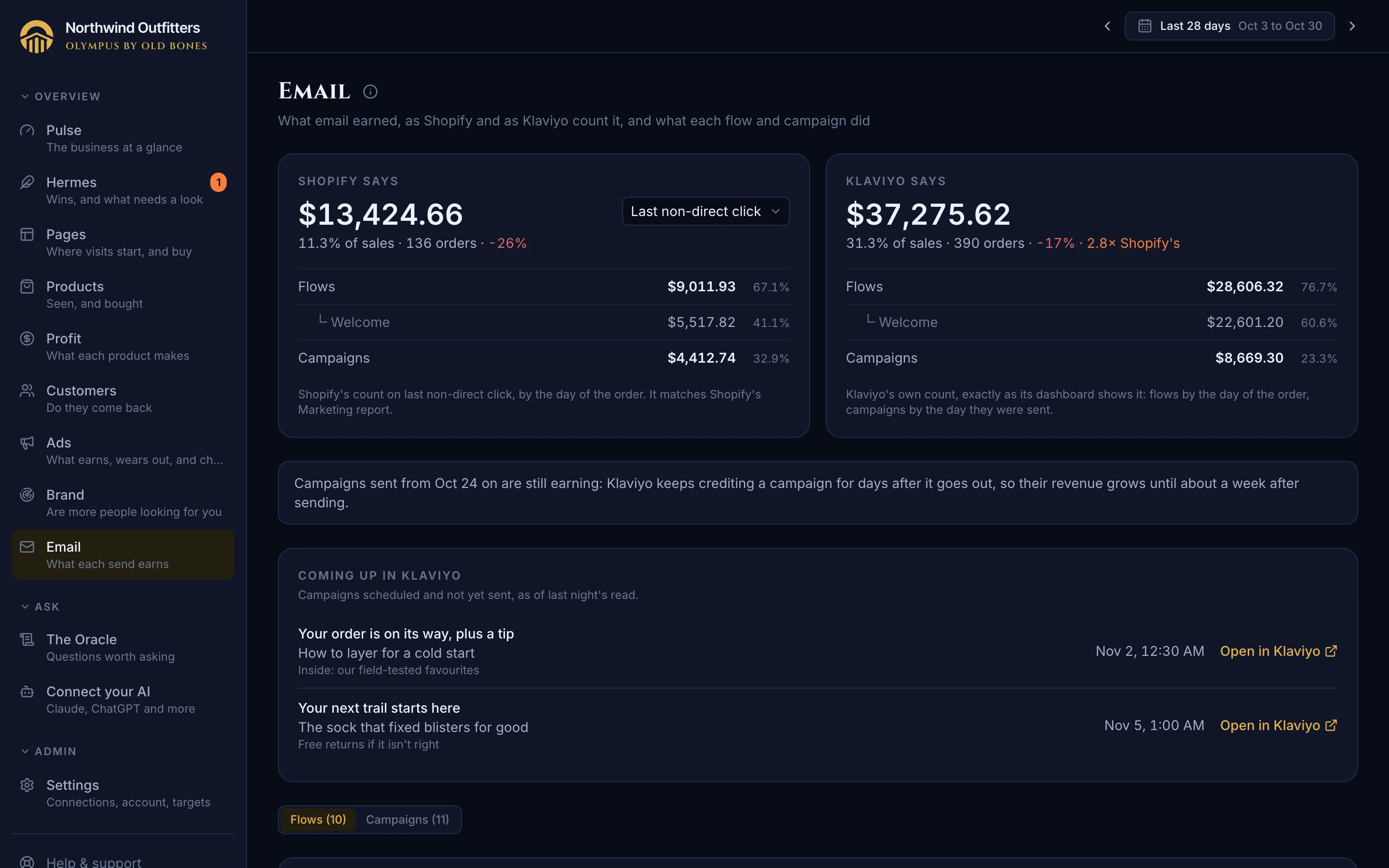
Email's revenue as Shopify counts it, on the attribution model you pick, beside sales and matching Shopify's own Marketing report. Klaviyo's own figure sits next to it, exactly as its dashboard shows it, with how many times larger it is. Every flow, with its job, sends, click rate and both revenues, and every campaign with its audience, click rate and revenue. Clicks lead, since Apple's privacy opens make open rates meaningless. Compare turns on its change against the period before or the same period last year. Without Klaviyo, Email still shows what Shopify credits to email, and says what connecting Klaviyo would add.
Sound familiar? Klaviyo says email made four times what Shopify does, nobody can say which to believe, and open rates of 75% that mean nothing.
Where: Email
Free
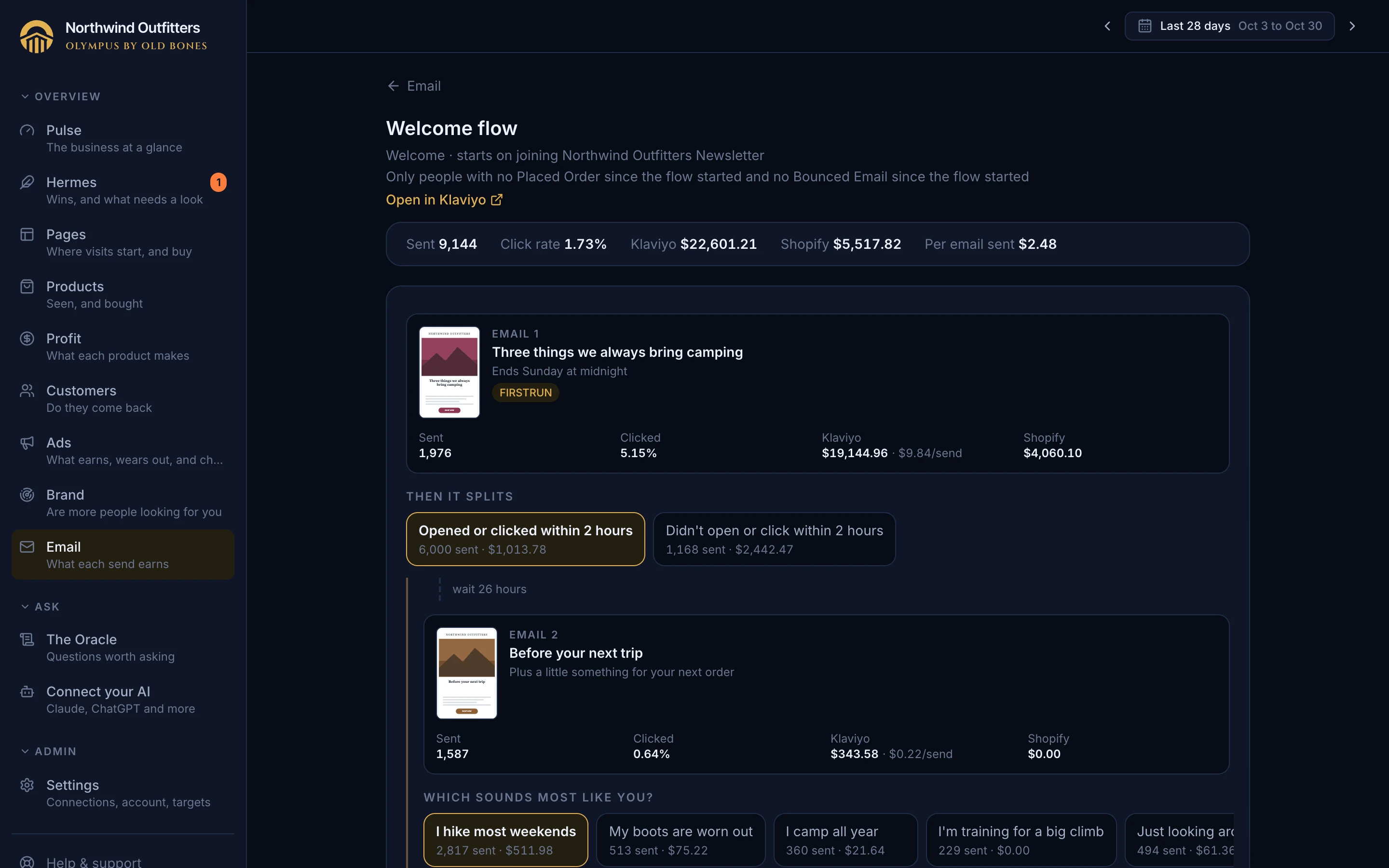
Olympus reads every Klaviyo flow and works out its job from what triggers it: welcome, abandoned checkout, abandoned cart, browse abandonment, post-purchase, cross-sell, winback and the rest. It also finds the list new signups join. You confirm or correct each one on one page. A job can hold more than one flow, such as a browser flow and its server-side backup, and a retired welcome flow keeps counting as welcome for the months it ran. Welcome revenue, your agents and the email view all count by what you confirmed, not by guessing from flow names. A core flow you haven't set up yet (winback, browse abandonment and the like) is named, and so is a flow stuck waiting on an event that stopped arriving.
Sound familiar? Flow names that say nothing ("[GP] Flow 3 copy"), backups that split one job's revenue in two, and welcome numbers that drop the day a flow is renamed or replaced.
Where: Settings, Email
PaidPantheon
Name an email the way you'd say it ("the last call email") and your AI reads it from Olympus: subject, preview text, where it sits in its flow, its words and a picture of it. Then it holds the email against what it did (sends, clicks, revenue) and against the emails beside it in the flow, so a review comes with the reasons, not just opinions on the design. Nothing to export or paste.
Sound familiar? Exporting an email to a PDF to ask an AI about it, and the AI still not knowing how it performed or where it sits in the flow.
Where: Your AI on the Pantheon plan
PaidPantheon
Ask "which flows made money these six weeks" or "how did the welcome flow do week by week" and your AI answers from the same figures as the Email page: every flow and campaign with its sends, clicks and revenue, as Shopify counts it and as Klaviyo does, over any dates you name. It can go week by week, or open one flow and go email by email.
Sound familiar? Exporting flow reports from Klaviyo to compare weeks, and an AI that can only see email's total.
Where: Your AI on the Pantheon plan
FreeMore on Pantheon
Found the email you want to change? One click opens it in Klaviyo's own editor: the flow, the exact email inside it, or the campaign's report. No hunting through Klaviyo's flow list and canvas for the one email buried three branches deep. It opens in the Klaviyo account you're signed into, and your AI gives the same link when it reviews an email.
Sound familiar? Spotting a problem email in Olympus, then spending minutes digging through Klaviyo's flows to find it again and fix it.
Where: Email, each flow's page and each email's panel; your AI on the Pantheon plan
Free
The Email page lists every campaign scheduled in Klaviyo and not yet sent, soonest first, with when it goes out on your store's clock. Each opens straight to its scheduled page in Klaviyo, for a last look or a change before it sends.
Sound familiar? Not knowing what's about to go out to your list without opening Klaviyo's calendar.
Where: Email, Coming up in Klaviyo